Repository and Unit of Work pattern in .NET Core
| Platform | Difficulty | Skills Required |
|---|---|---|
| Cross / .NET | Beginner | C#, .NET |
In a nutshell
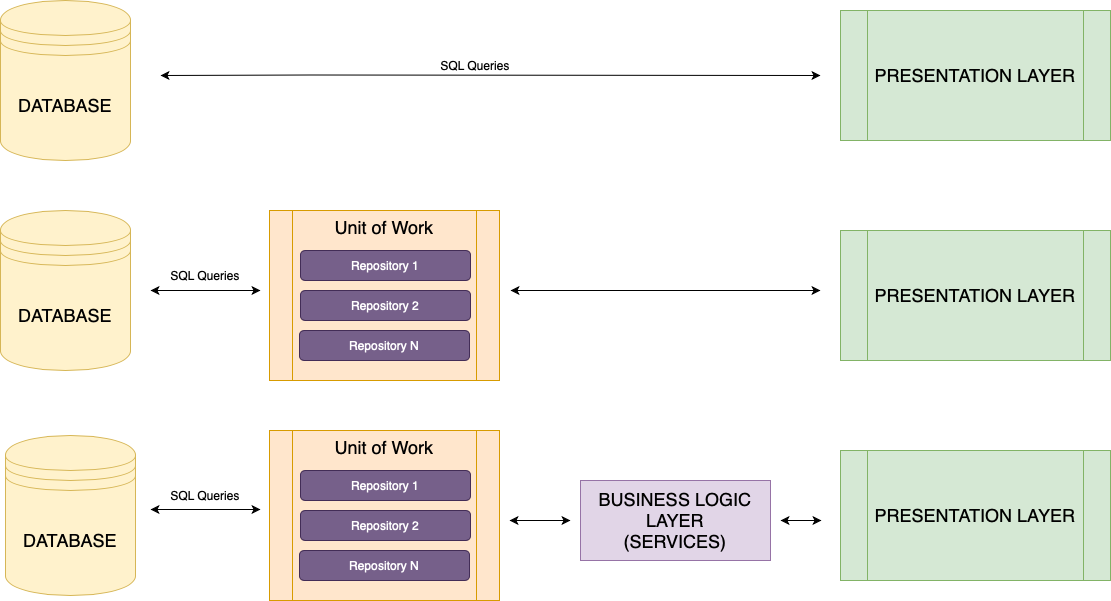
Direct sql queries from application (presentation layer) to database is not a very elegant and very maintainable approach (1st option in Figure).
The most common approach used by developers is the repository pattern that wraps query code, creating the data layer.
On top of that we will wrap the repositories code in a single Unit of Work (2nd option in Figure).
An even better final scheme is the last one (3rd option in Figure), where a business logic middleware is added between data access and presentation.
This can be scaled even more with micorservices instead of the monolithic approach shown here, but is out of scope of current tutorial
Steps breakdown
We will create a Web App called [AppTitle] which will act as our presentation (application) layer that interacts with the database for CRUD operations using aforementioned pattern.
The solution will consist of three projects:
- [AppTitle].Data - Class Library
- [AppTitle].Infrastructure - Class Library
- [AppTitle].Web - MVC Project
[AppTitle].Data - Class Library
This is the data layer of the application. Contains two directories Entities and Interfaces. In the first directory you will include all the classes - objects (ex User.cs, Product.cs etc).
Now the other directory is where it gets interesting. Here we are going to define the way our application should interact with the database. In other words we are going to set the requirements for querying the database. In order to do that we will make a somewhat heavy use of Interfaces.
Let's start by defining a generic way for basic CRUD operations. We will name it IGenericRepository.cs and will reside under directory Interfaces\Generic.
namespace [AppTitle]_data.Interfaces.Generic
{
    public interface IGenericRepository<T, K> where T : class where K : struct
    {
        Task<T> GetByIdAsync(K id);
        Task<IReadOnlyList<T>> GetAllAsync();
        Task<K> AddAsync(T entity);
        Task<int> UpdateAsync(T entity);
        Task<int> DeleteAsync(K id);
    }
}
Since we want our repo to be asynchronous ready we will use Task. In this code K is the actual object type (the ones defined in Entities directory) and T is the key type. This could be left as int but why not keep it generic as well?
The definitions are pretty much self explanatory and not explained further. With our generic repository defined, it's time to define our object repositories that will conform to above generic repository.
All these interface definitions will reside under Interfaces. Let's suppose we want to define the repository for User object with properties:
namespace [AppTitle]_data.Entities
{
    public class User
    {
	int ID { get; set; } // primary key
	string Name { get; set; }
	long DOB { get; set; }
    }
}
namespace [AppTitle]_data.Interfaces
{
public interface IUserRepository : IGenericRepository<User, int>
{
}
}Above code informs the compiler that User Repository conforms to generic repository with an integer as id and of type User.
And for Product object with properties:namespace [AppTitle]_data.Entities
{
public class Product
{
string SKU { get; set; } // primary key
string Name { get; set; }
float Weight { get; set; }
}
}namespace [AppTitle]_data.Interfaces
{
public interface IProductRepository : IGenericRepository<Product, string>
{
}
}Notice the string instead of int, since the unique id for Product in our case is string SKU.
Last but not least define the UnitOfWork interface under Interfaces
namespace [AppTitle]_data.Interfaces
{
    public interface IUnitOfWork
    {
        IUserRepository Users { get; }
        IProductRepository Products { get; }
    }
}
The implementation of this interface is what is actually called in the presentation level. More on that later.
Since this is the data layer of the application and contains only interface definitions, there is no need to add any dependencies.
[AppTitle].Infrastructure - Class Library
This is the infrastructure layer of our application which contains the actual implementations for all interface declarations in data layer above. This is the middleware between interface and data and where the actual database/query code is.
Contains one directory Repositories In this directory you must include the implementation for each interface created earlier. Implementations depend on underlying database. In our example we keep things as simple as possible with an SQLite database (this is a single file sql database).
We will provide the implementation for User.
namespace [AppTitle]_infrastructure.Repositories
{
    public class UserRepository : IUserRepository
    {
        private readonly IConfiguration configuration;

        public UserRepository(IConfiguration configuration)
        {
            this.configuration = configuration;
        }

        public async Task<User> GetByIdAsync(int id)
        {
            var sql = "Select * From Users Where ID = @ID";
            using (var connection = new SqliteConnection(configuration.GetConnectionString("DefaultConnection")))
            {
                var result = await connection.QuerySingleOrDefaultAsync<User>(sql, new { ID = id });
                return result;
            }
        }

        public async Task<IReadOnlyList<User>> GetAllAsync()
        {
            var sql = "SELECT * FROM Users Order By ID";
            using (var connection = new SqliteConnection(configuration.GetConnectionString("DefaultConnection")))
            {
                var result = await connection.QueryAsync<User>(sql);
                return result.ToList();
            }
        }

        public async Task<int> AddAsync(User entity)
        {
            using var connection = new SqliteConnection(configuration.GetConnectionString("DefaultConnection"));
            var result = await connection.QuerySingleOrDefaultAsync<int>(@"Insert Into Users(Name, DOB) Values(@Name, @DOB) returning id", entity);
            return result;
        }

        public async Task<int> UpdateAsync(User entity)
        {
            throw new NotImplementedException();
        }

        public async Task<int> DeleteAsync(int id)
        {
            throw new NotImplementedException();
        }

    }
}
You must include NuGet Package Dapper and the corresponding Nuget driver package for your database (in our case Microsoft.Data.SQLite).
We should also provide the implementation for IUnitOfWork declared earlier. This is the middleware we are calling from our top level of application, is it not?
namespace [AppTitle]_infrastructure.Repositories
{
    public class UnitOfWork : IUnitOfWork
    {

        public UnitOfWork(IUserRepository userRepository)
        {
            Users = userRepository;
        }

        public IUserRepository Users { get; }

    }
}
You would add in IUnitOfWork/UnitOfWork all implementations for entities defined in [AppTitle].Data project, such as IProductRepository mentioned above.
Finally, we will add the boilerplate code necessary for the dependency injection, in order to have the required instances injected whenever and wherever in the code we want them.
namespace [AppTitle]_infrastructure
{
    public static class ServiceRegistration
    {
        public static void AddInfrastructure(this IServiceCollection services)
        {
            services.AddTransient<IUserRepository, UserRepoisitory>();
	    // add more
	    // ...
            services.AddTransient<IUnitOfWork, UnitOfWork>();
        }
    }
}
Add above file in top level directory of Infrastructure project. We won't dive much deeper into dependency injection in this tutorial.
Install NuGet Package Microsoft.Extensions.DependencyInjection.Abstractions
[AppTitle].Web - MVC Project
We now have the Data Layer (Entities and Middleware) finished, we are ready to use it! In Program.cs add
builder.Services.AddInfrastructure();This is necessary for the framework and will inject necessary instances where we want. We'll assume you have made the initial setup of this project and tested it and you are about to use your data layer built earlier inside your controller.
namespace [AppTitle]_devel.Controllers
{
    public class UsersController : Controller
    {

        private readonly ILogger<UsersController> _logger;
        private readonly IUnitOfWork _unitOfWork;

        public UsersController(ILogger<UsersController> logger, IUnitOfWork unitOfWork)
        {
            _logger = logger;
            _unitOfWork = unitOfWork;
        }

        public async Task<IActionResult> Index()
        {
            var users = (await _unitOfWork.Users.GetAllAsync()).OrderBy(p => p.Name);
            return View(users);
        }

        public async Task<IActionResult> Details(int id)
        {

            var user = await _unitOfWork.Users.GetByIdAsync(id);

            // If a user with the specified ID was not found, return a 404 Not Found response.
            if (user == null)
            {
                return NotFound();
            }

            return View(user);
        }

    }
}
And that's about it! Beautiful, isn't it?