Fancy welcome screen in login shell for Debian
| Platform | Difficulty | Skills Required |
|---|---|---|
| Debian/Linux | Beginner | Bash |
Caution
Since we are going to edit a system-wide file and a typo might mess everything, it is a good practice to make a backup of the file.
However, in case you forgot to do so, there is a copy of the system default profile in /usr/share/base-files directory.
* For user specific and not system-wide, edit file /[user]/.profile instead. *
What will need
Root access to the system and a text editor such as vi/vim, nano etc.
Optional
Figlet and fortune (see below).
In a nutshell
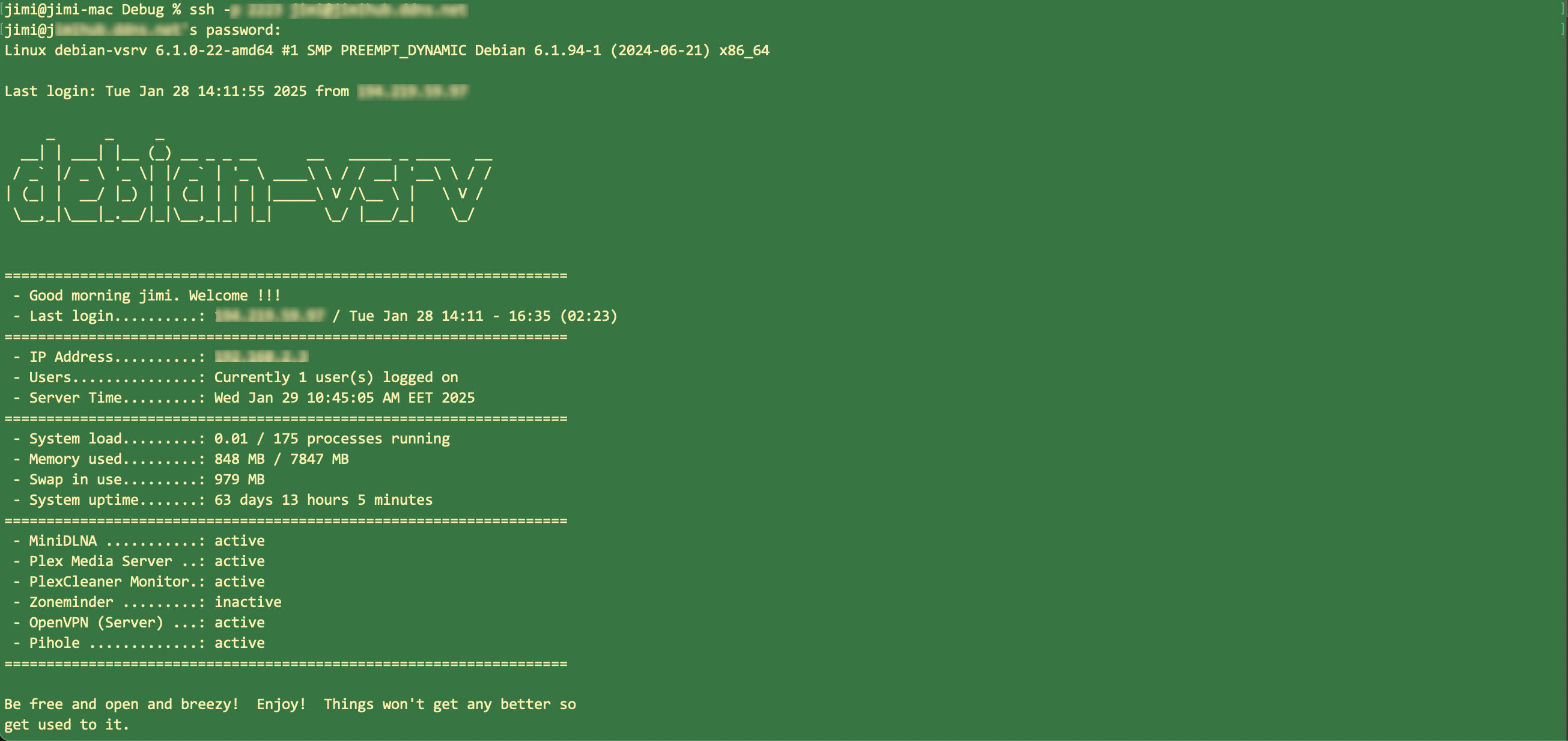
Upon login is always nice to have a quick and well formatted overview of what's going on.
We will include information such as: last login, resources usage, uptime.
Also since in my system I have some services set up using systemctl that should be up and running 24/7, I included a status info for each of them.
Finally, a quote for inspiration or just a joke (oftentimes a bad one) is always a good way to start messing with linux systems. 😁
Steps Breakdown
Since we need to query a lot of information, we will start by executing the necessary commands and hold them on variables. Finally we will format print everything with a big echo.
-
Store your last login info
LAST_LOGIN=$(last | grep `whoami` | sed -n 2p | awk '{print $3" / "$4" "$5" "$6" "$7" " $8" " $9" " $10}') -
Query online users
ONLINE_USERS=$(users | wc -w) -
System uptime info
upSecs=$(cat /proc/uptime | cut -f1 -d.) upDays=$((upSecs/60/60/24)) upHours=$((upSecs/60/60%24)) upMins=$((upSecs/60%60)) -
System & Memory info
SYS_LOADS=`cat /proc/loadavg | awk '{print $1}'` SWAP_USED=`free -m | tail -n 1 | awk '{print $3}'` NUM_PROCS=`ps aux | wc -l` MEMORY1=`free -t -m | sed -n 2p | awk '{ print $3" MB"; }'` MEMORY2=`free -t -m | grep "Mem" | awk '{print $2" MB";}'` -
IP Address of host
IPADDRESS=`/sbin/ifconfig | grep -A 1 'eno1' | tail -1 | awk '{print $2}'` # Replace eno1 with your network interface -
Finally, in order to retrieve the status of services we need to query systemctl
OPENVPN_STATUS=$(systemctl check openvpn@server) # Edit accordingly -
Include a greeting based on time of day
HOUR=$(date +"%H")
if [ $HOUR -lt 12  -a $HOUR -ge 0 ]; then
    TIME="morning"
elif [ $HOUR -lt 17 -a $HOUR -ge 12 ]; then
    TIME="afternoon"
else
    TIME="evening"
fi
The big echo
We now have everything to start wrapping up our output.
echo "
===================================================================
- Good $TIME `whoami`. Welcome !!!
- Last login..........: $LAST_LOGIN
===================================================================
- IP Address..........: $IPADDRESS
- Users...............: Currently $ONLINE_USERS user(s) logged on
- Server Time.........: `date`
===================================================================
- System load.........: $SYS_LOADS / $NUM_PROCS processes running
- Memory used.........: $MEMORY1 / $MEMORY2
- Swap in use.........: $SWAP_USED MB
- System uptime.......: $upDays days $upHours hours $upMins minutes
===================================================================
- OpenVPN (Server) ...: $OPENVPN_STATUS
==================================================================="
Append all above snippets right after export $PATH command inside /etc/profile.
It is advised to test individual commands in a shell before actually merging in /etc/profile.
Logout -> login and voila!
Add some more
If you want the complete output of included figure you must install figlet and fortune.
$ sudo apt-get install fortune figletAppend
figlet $hostnameright before your big echo. Maybe add a linebreak as well.
Finally, after your big echo add one or two linebreaks and
fortune